A job-search toolkit for your AI agent.
OpenApply is a free MCP toolkit for Claude Code, Codex and Cursor. Your agent searches 250,000+ live roles, tailors a resume checked line by line against your own, and fills the employer’s real form. Then it stops before Submit, every time.
$ git clone https://github.com/nturl/openapply
Nothing has been sent. Approving lets your agent press Submit on this exact form.
Code LH-30417 · 0 unverified factsFind, tailor, fill, approve.
OpenApply gives your agent the job index, the guardrails and a real browser, and gives you a dashboard to check its work.
-
01 · FIND
A short list, ranked for you
One sync pulls every open role from 8,700+ company job boards, plus remote feeds and HN Who’s Hiring. Matches are scored against your target titles, resume, location, remote preference and salary floor, with the reasons shown. Run it once a day.
sync_jobslist_matchessearch_jobs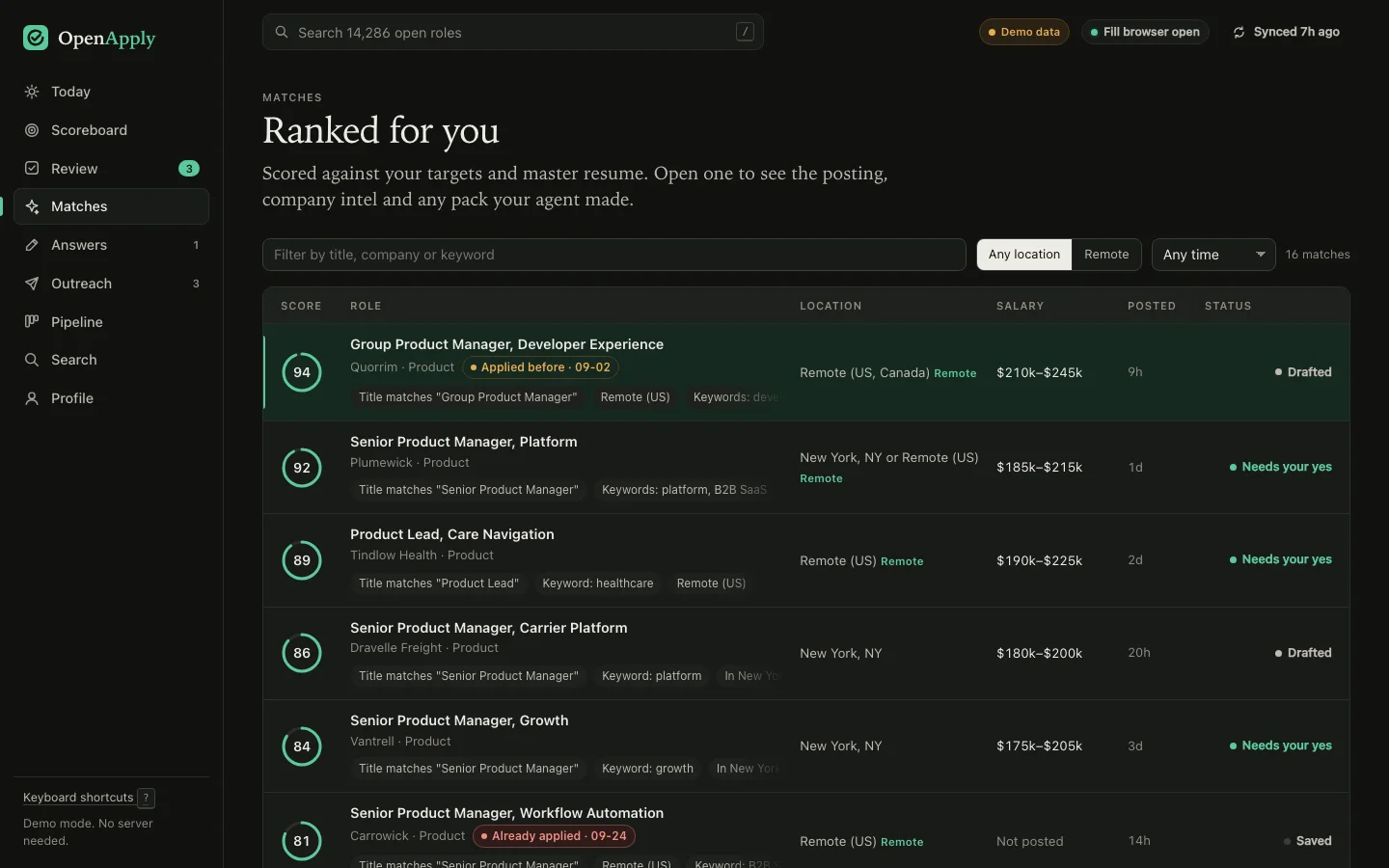
-
02 · TAILOR
Know why they’re hiring now
Each pick gets a company brief: open and new roles by team, why the company is hiring now, proof-of-work ideas and sharp questions to ask. Then your agent writes the resume, cover letter and answers in your voice, and OpenApply checks every line against your master resume.
company_briefget_tailoring_briefsave_application_packdraft_why_us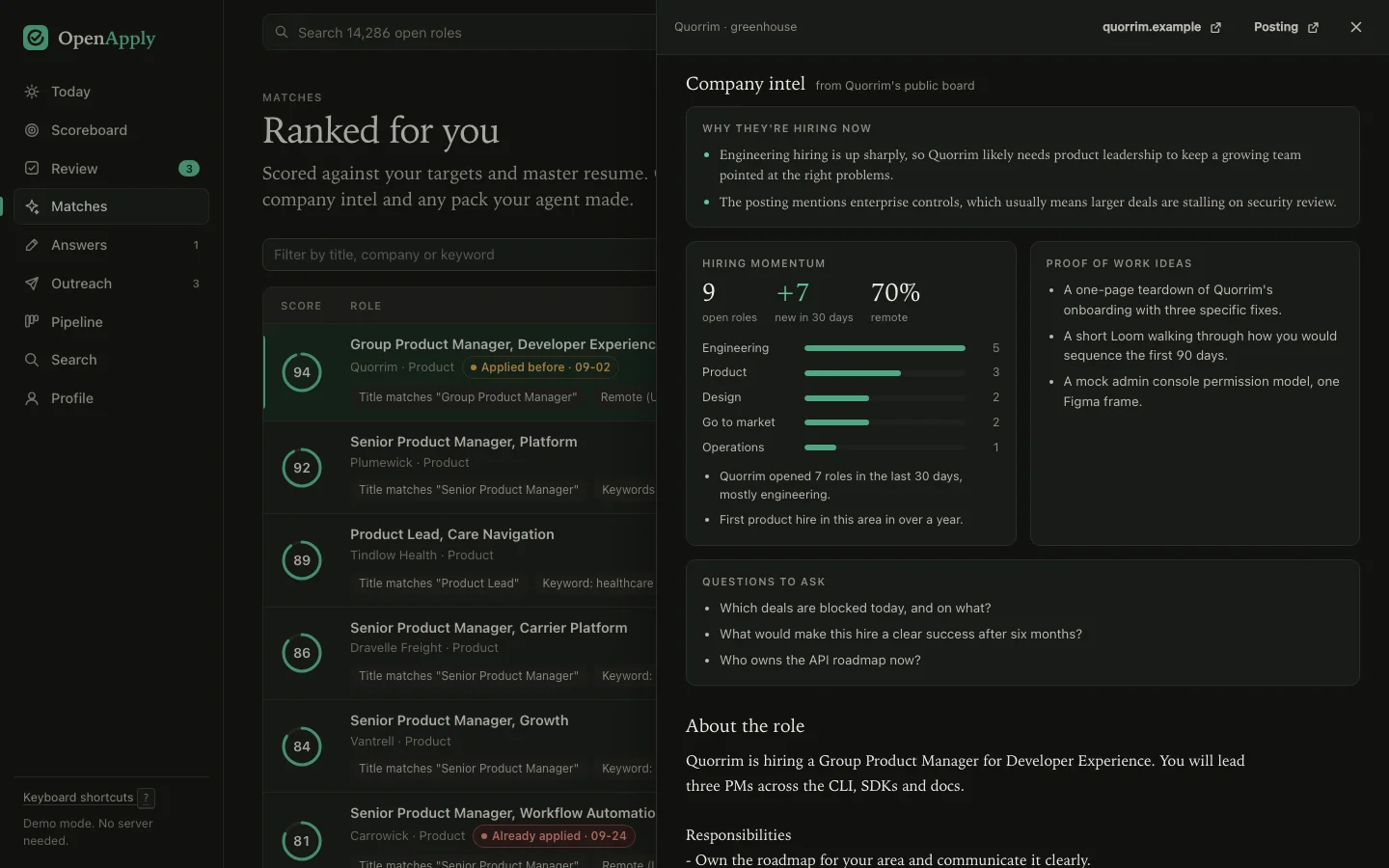
-
03 · FILL
The employer’s real form, in a real browser
OpenApply opens the application in a visible browser, fills every field it can, attaches the tailored PDFs and stops before Submit. Questions only you can answer come back to you instead of getting a guess.
inspect_applicationfill_application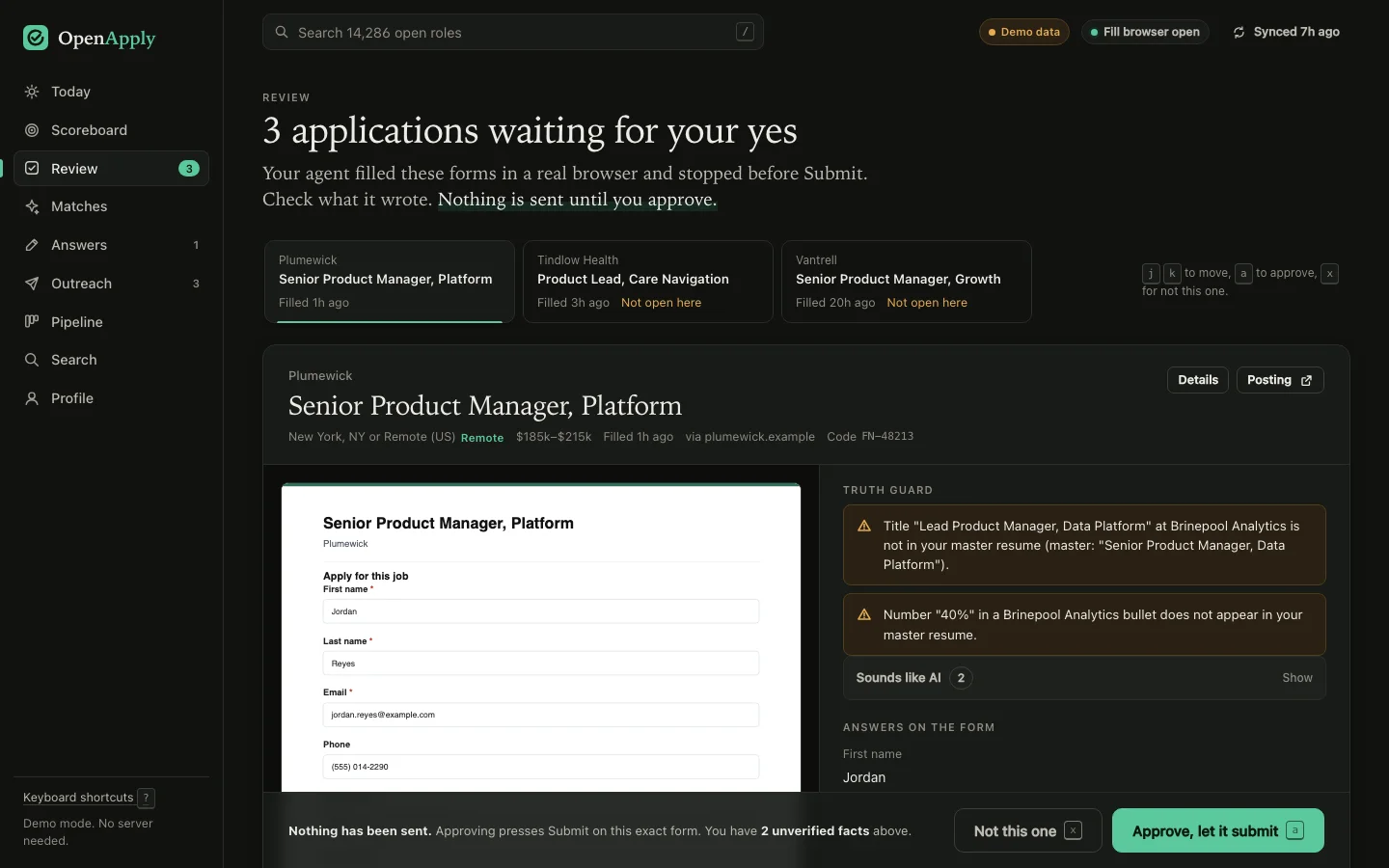
-
04 · YOUR YES
Approve, then follow up with a person
You see exactly what was filled, with a screenshot. Approve and your agent presses Submit on that exact form. Then it tracks the reply, drafts a short note to the person hiring and reminds you when a weekly nudge is due. A Scoreboard tab counts each week’s asks, applications and first conversations against the targets you set.
submit_applicationdraft_outreachdue_follow_upsstrategy_scoreboard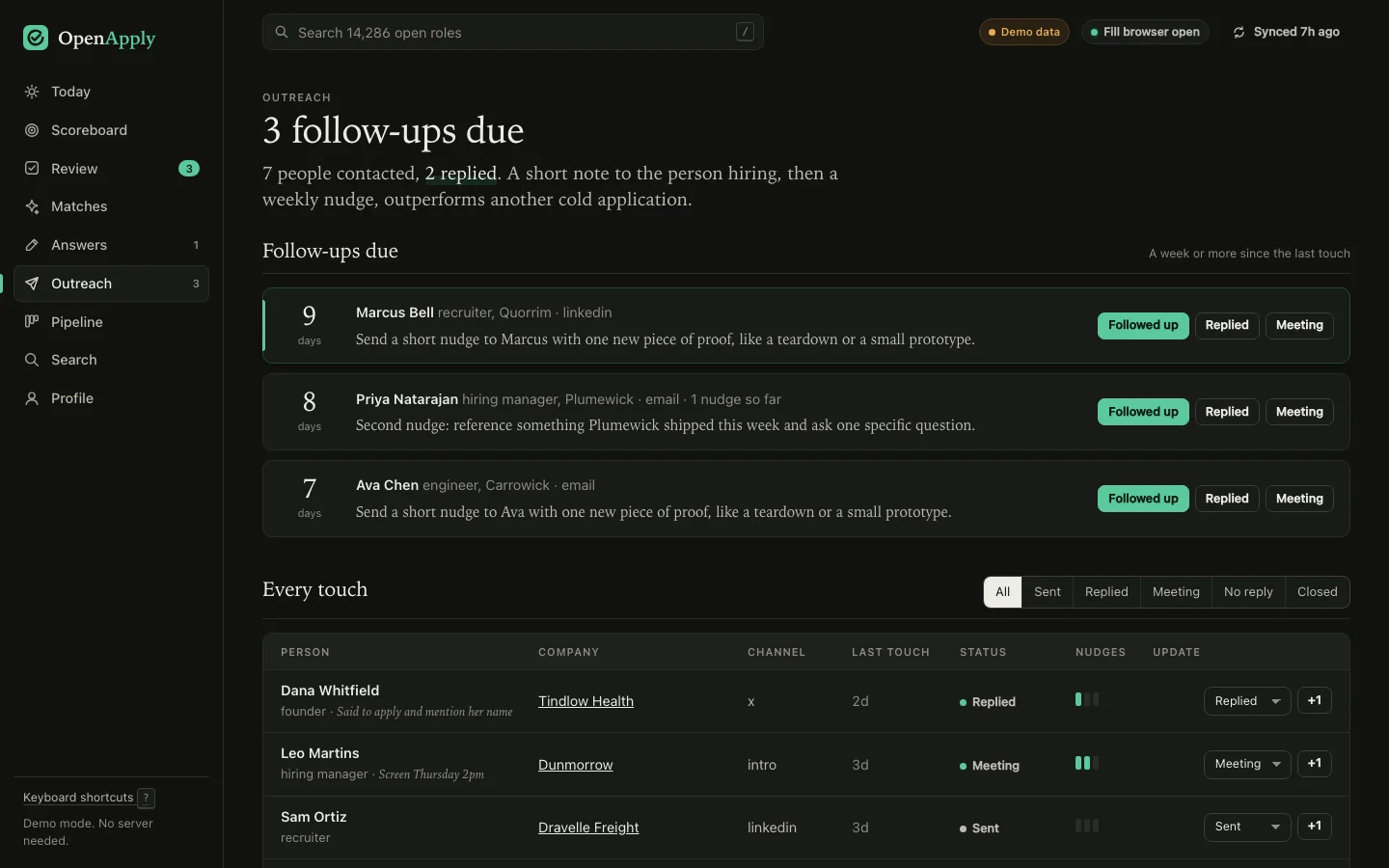
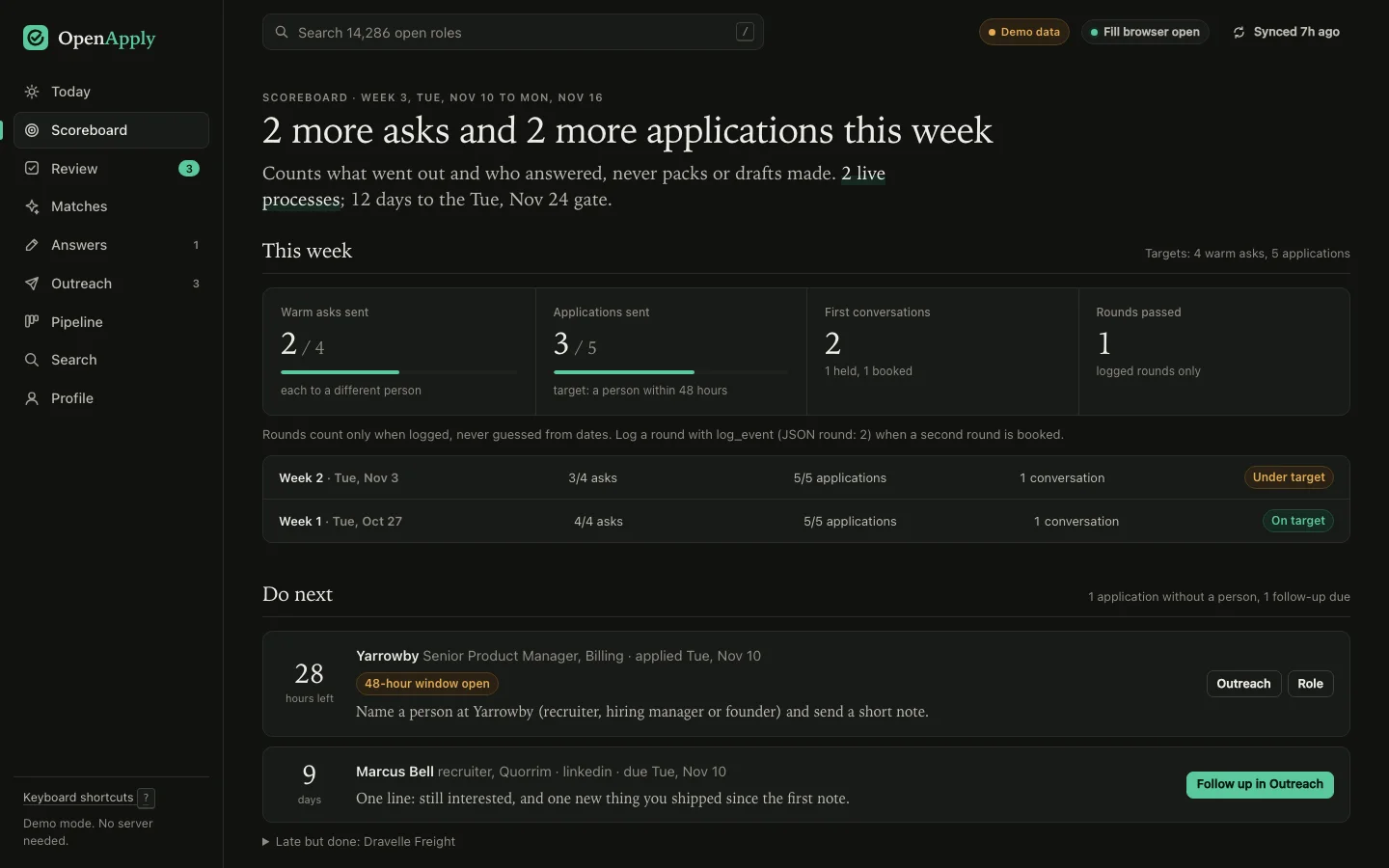
Screens from the OpenApply dashboard, shown with sample data. The dashboard runs at 127.0.0.1 and never leaves your machine.Click through the demo ↗
Six rules, enforced in code.
Truth guard
A tailored resume can reword, but it can’t add. Any number, employer, title, school, date or skill that isn’t in your master resume gets flagged before you see the pack.
Voice guard
Flags the phrasing that makes every AI application sound the same, and any letter that never names the company. Tailoring starts from samples of your own writing.
You write the why
“Why this company?” never gets invented enthusiasm. Your agent can draft one paragraph that ties a fact from the posting to work you have really done; it is saved as a draft, and the form stays locked until you edit it or keep it. Relocation and office-day questions come back to you unless your profile already answers them.
One fill, one yes
Filling returns a one-time code. Submit only works with that code, on that exact fill. Re-fill, re-open or navigate and the approval is void. The agent can’t approve itself.
No CAPTCHA games
CAPTCHAs and login walls are never solved or bypassed. The run stops, the browser window stays open and you finish it yourself.
Local, all of it
No account, no key, no server, no telemetry. Your profile, packs and pipeline sit in one folder. Network calls go to public job boards and to the forms you open.
~/.openapply/
  openapply.db   index + pipeline
  profile.json   you
  packs/         per-role PDFs
  browser-profile/
Research, proof of work, outreach.
-
Why now
Hiring signals straight from the company’s public board: open and new roles by team, the seniority mix, and what the posting says about the problem they’re hiring for.
-
Proof of work
Project ideas shaped to the specific company, so you can show the work instead of describing it.
-
Reach the person
Who to contact and how, short-message rules, a log of every touch and a weekly follow-up reminder, up to three nudges. It never scrapes LinkedIn or makes up an email address.
Runs inside the agent you already use.
Clone it, build it, register it as an MCP server. Your agent picks up the tools, the flow and the approval rule on its own.
# install and build
$ git clone https://github.com/nturl/openapply && cd openapply
$ npm install && npx playwright install chromium
$ npm run build

# connect
$ claude mcp add -s user openapply -- node "$PWD/dist/mcp.js"
# install and build
$ git clone https://github.com/nturl/openapply && cd openapply
$ npm install && npx playwright install chromium
$ npm run build

# connect
$ codex mcp add openapply -- node "$PWD/dist/mcp.js"
# after install and build, add to your client's mcpServers
{
  "openapply": {
    "command": "node",
    "args": ["/absolute/path/to/openapply/dist/mcp.js"]
  }
}

# prints the exact paths for your machine
$ node dist/cli.js connect
Use OpenApply. Import my resume from ~/resume.pdf, find remote product roles that fit me, and get the best one ready. Show me before you submit anything.
Needs Node 22.5+ for built-in SQLite. Fills with Playwright’s Chromium, or point OPENAPPLY_BROWSER_PATH at any Chromium-based browser. The openapply command comes from npm link; without it, run node dist/cli.js.
- Set up your profile
openapply init ~/resume.pdfimports your resume. Add targets, work authorization, a salary floor and a few things you wrote yourself. - Build the index
openapply syncpulls every board in a few minutes. Run it once a day. - Open the dashboard
openapply uiserves the review screens at127.0.0.1:4646. - Work through your agentPick a short list, read the briefs, review each pack, approve what you’d sign.
What it won’t do.
- Submit anything you haven’t approvedNot a setting you can turn off. The agent can fill, never approve.
- Mass-applyIt’s built for a focused list, with your yes on every send.
- Fill Workday, iCIMS, Taleo or Easy ApplyGreenhouse, Lever and Ashby have adapters; other sites use a generic filler and may need you to finish in the browser. Workday roles are searched and read in full, but each employer needs its own Workday account, so you apply in your browser and record it. iCIMS, Taleo and LinkedIn Easy Apply are not supported.
- Guard against other software on your machineThe approval gate keeps an agent from sending what you haven’t seen. It isn’t a sandbox for anything else running as you.
Free and MIT-licensed.
Clone it and point your agent at it.